Boost to the TOP
Promotional tool for sellers on the marketplace Uzum Market
Context
Uzum is the largest marketplace in Uzbekistan and part of the Uzum ecosystem. Sellers lacked a convenient and transparent way to promote their products. Existing advertising tools were inconvenient and ineffective. We decided to launch a new advertising tool based on the CPM model.
Business goals
- Create a new, user-friendly promotion tool based on the CPM model
- Increase advertising revenue (AdRev)
- Boost GMV through advertising and sellers’ sales
- Build greater trust in advertising tools
- Grow the share of active advertisers
Results
15x
AdRev increased 15x compared to the previous model
+31%
The number of sellers actively using advertising grew by 31%
+35%
Average sales of sellers increased by 35%
3x
The number of promoted products tripled
New division
The project’s success led to creation of a dedicated “AdRev” team.
5%
“Boost to TOP” holds about 5% of Uzbekistan’s digital advertising market
My role
The sole designer on the team. I designed the product from scratch: conducted research, built the UX logic, created interfaces, and tested them with users.After launch, handled seller training, wrote instructions, and collected feedback and bug reports.The project involved 7 cross-functional teams and over 30 people.

Challenges
- High tool complexity. The tool was built from scratch and was comparable in complexity to Google Ads and Yandex.Direct.
- Dozens of new mechanics: CPM model, targeting, moderation, reporting, finance.
- First CPM advertising experience in the Uzbekistan market. Sellers had neither experience nor trust in the new format.
- Local specifics. Seller behavior and digital literacy levels differed significantly from other markets.
- Scalability. The tool needed to become the foundation for all future advertising on the platform.
- Cross-team development. Seven teams and over 30 people were involved in the development.
- Frequent requirement changes. The project went through a pivot: the business model changed, but deadlines remained the same.
- Lack of design system. Everything was designed from scratch, including scalable design patterns.
- Unstable processes. The company was growing, organizational structure was changing, there was team turnover — so autonomous work was necessary.
Discovery
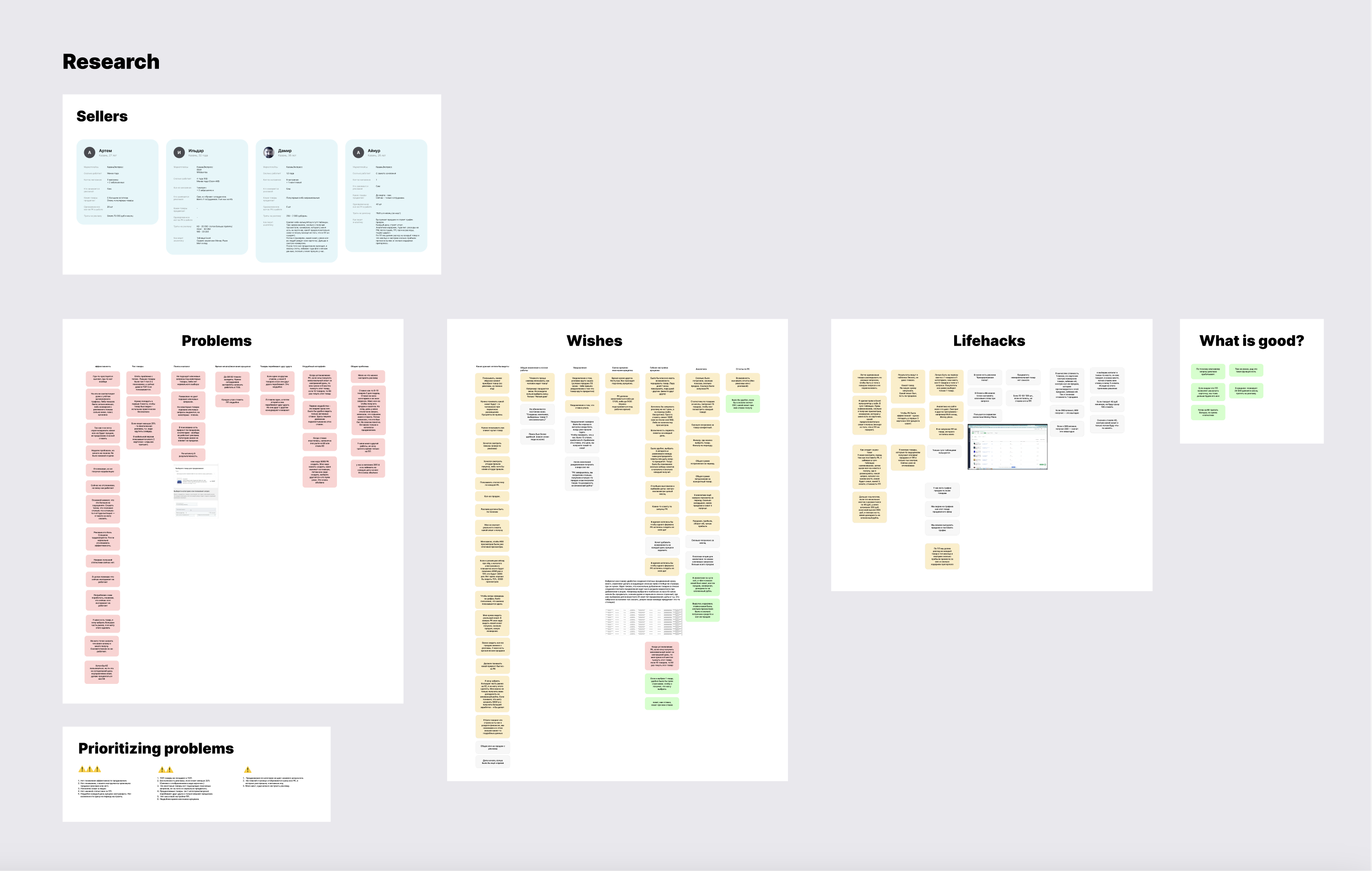
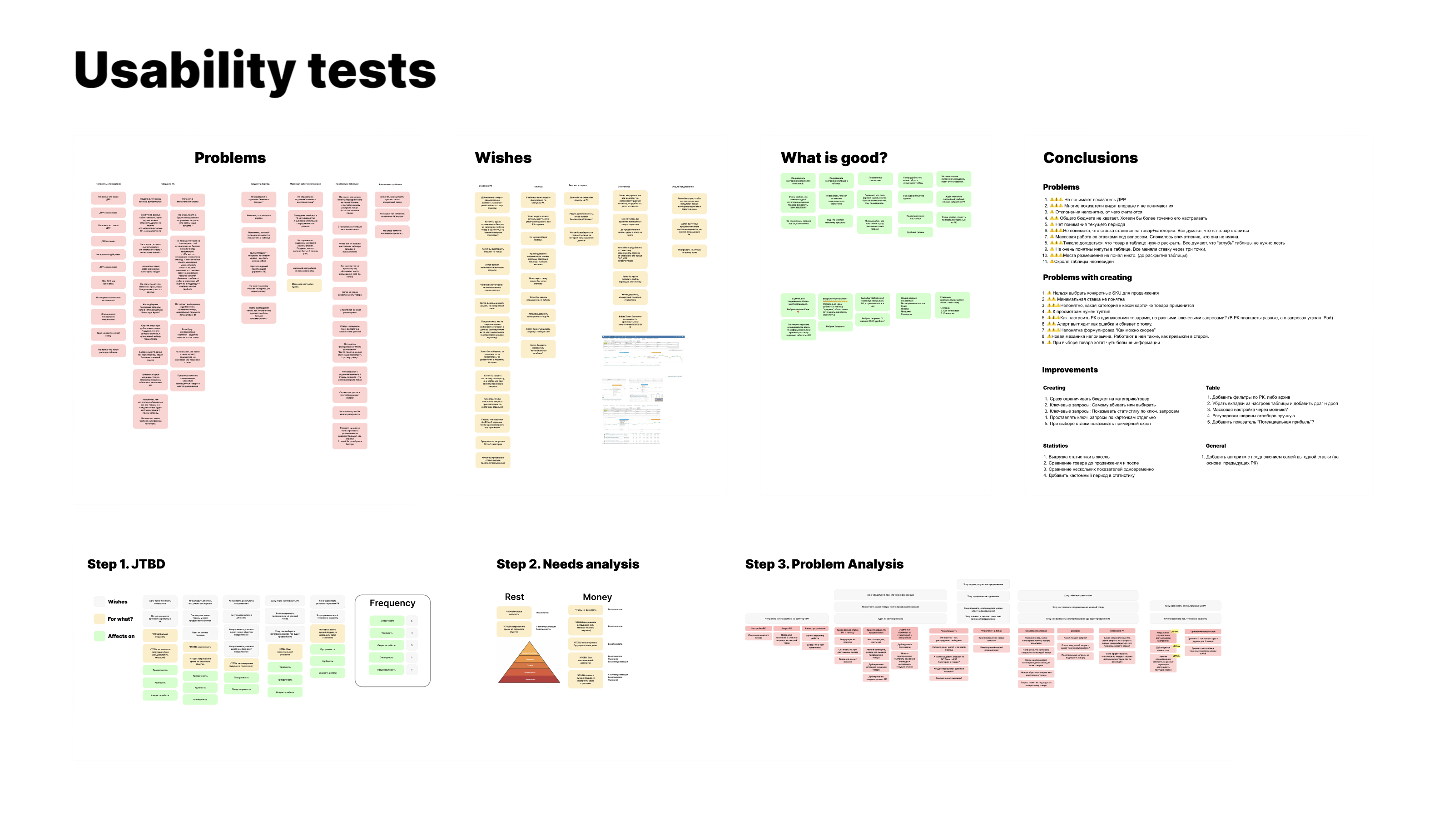
To gain a deeper understanding of the task and constraints, a full discovery cycle was conducted:
- Briefings with stakeholders to clarify goals, risks, and limitations
- Competitor analysis
- Six interviews with sellers to identify pain points and expectations
- Problem analysis and creation of a pain points map
- Formulation of key scenarios and MVP requirements
All these steps helped lay a solid foundation for the product decisions.
Concepts and prototypes
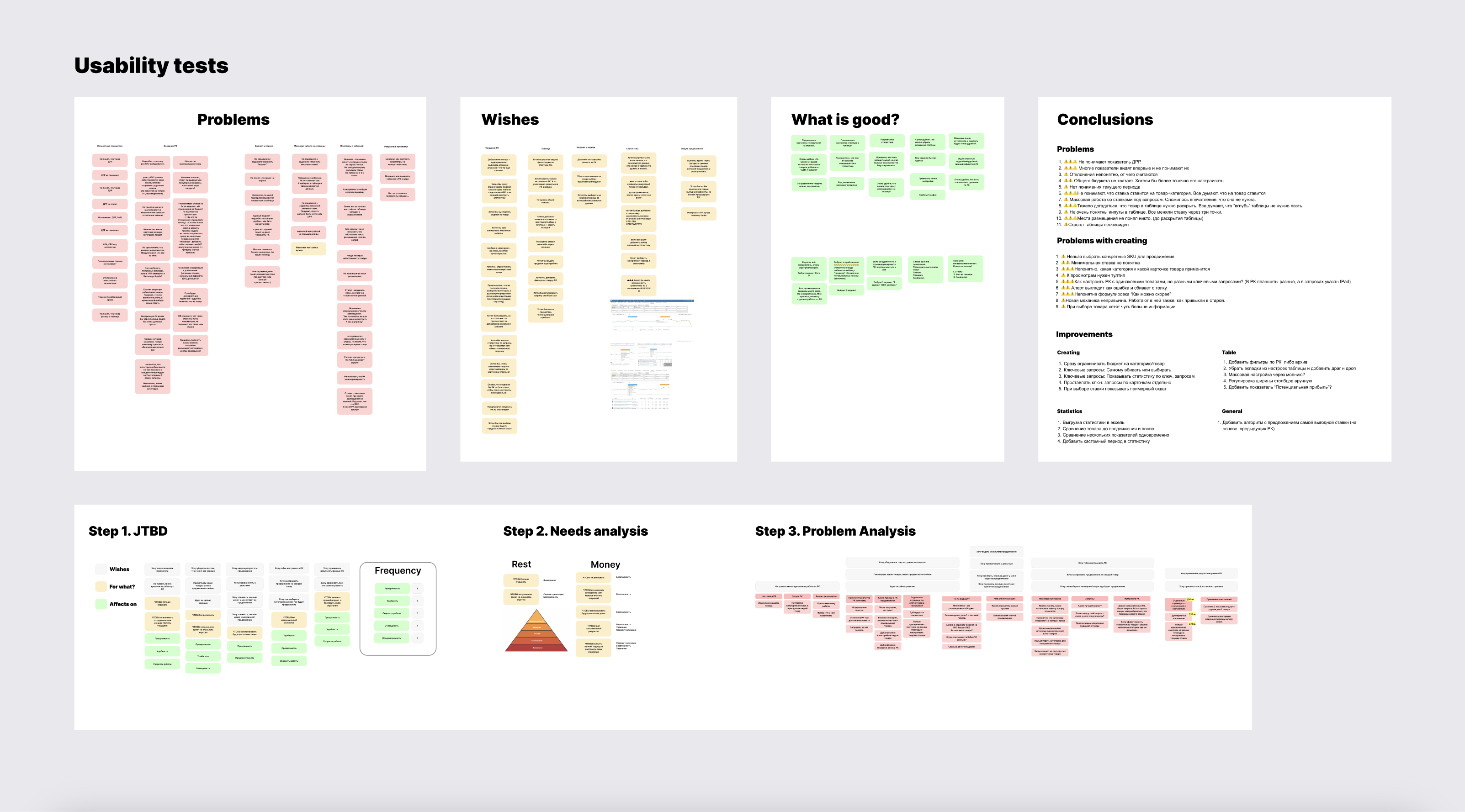
Problem: Quickly determine which solution suits us best
Challenge: The tool is too large-scale and technically complex for traditional A/B testing
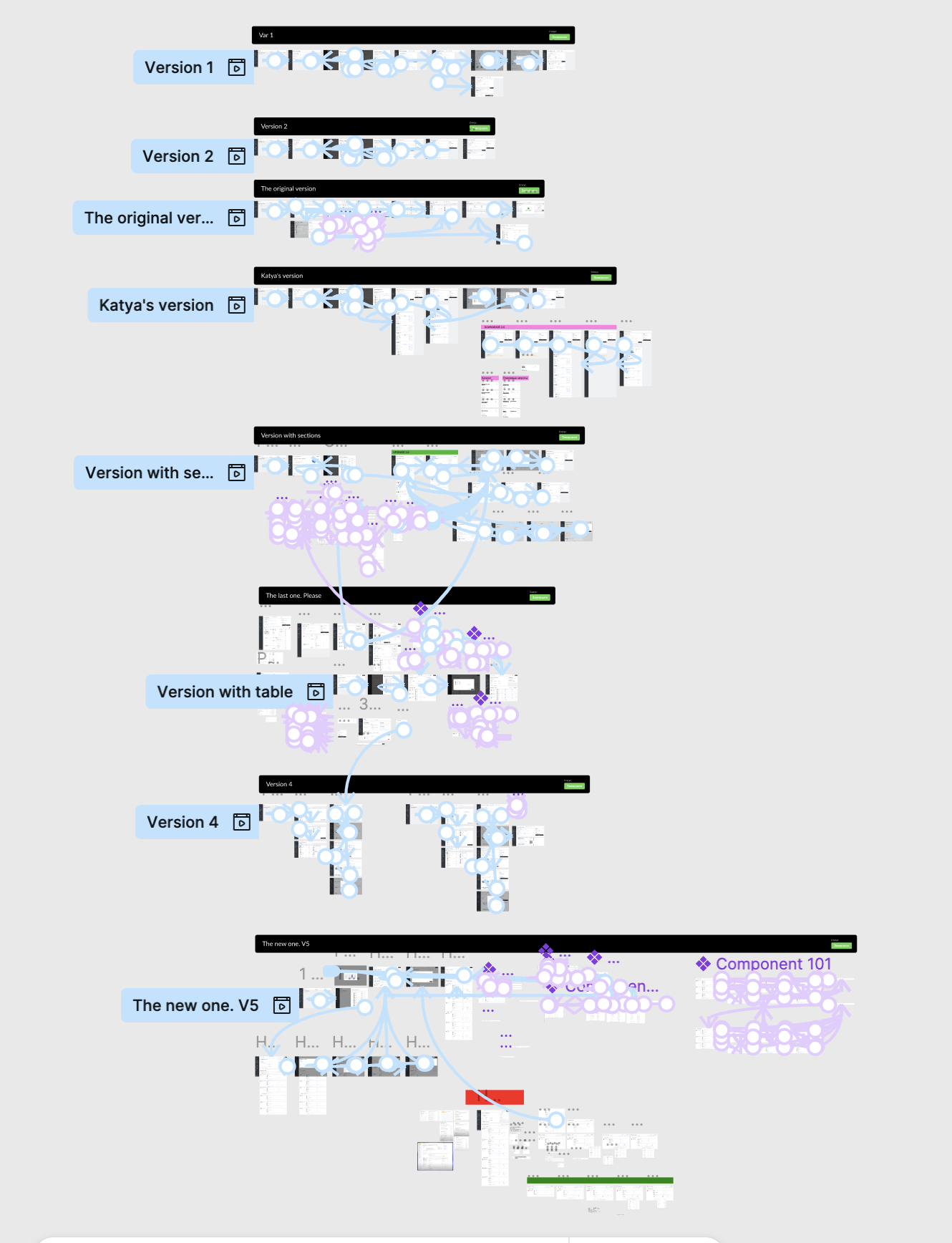
Solution: We used usability testing of different concepts during the design phase:
- Created 5+ different interface concepts.
- Developed clickable interactive prototypes for each.
- Conducted 20+ usability tests with sellers
Result:
- Identified misunderstandings of mechanics and blockers early on.
- Found an excellent working solution.
- Saved development time
Design
Creating an advertising campaign
Problem: Creating an advertising campaign requires filling in a large number of parameters
Challenge: The tool is complex and it’s easy to get confused with the settings
Solution: Broke down the campaign creation process into 3 consecutive steps:
- Setting general parameters: campaign name, budget, duration.
- Selecting products — a convenient list with filters, search, and SKU display.
- Configuring promotion placements — separately for each product
Result:
- Simplified the initial user experience with the tool.
- Made navigation clear even for beginners.
- Reduced the number of errors and incomplete settings.
Promotion settings
Problem: The seller needs flexible settings for each product in every promotion placement
Challenge: Transition to a CPM model requires very precise configuration for each promotion placement
Solution:
- Separated keywords and catalog categories, assigning them to each product.
- Display all catalog categories at once.
- Added negative keywords to exclude irrelevant queries.
- Added advertising cost settings for each promotion placement separately
Recommended keywords
Problem: Sellers don’t know which keywords to use for promoting their products
Challenge: Recommendations vary for each product
Solution: Added a list of popular search queries from the past 7 days. Sellers can select the needed keywords directly from the suggestions
Result: 70% of all keywords are added from this section
Bulk editing
Problem: Setting up ads takes too long when there are many similar products
Challenge: Not all products can be grouped together — it was important to exclude incompatible items.
Solution: Added bulk editing. Sellers select a group of similar products (e.g., within the same category) and apply unified promotion settings.
Result: According to analytics, 50% of sellers use this feature regularly.
Analytics
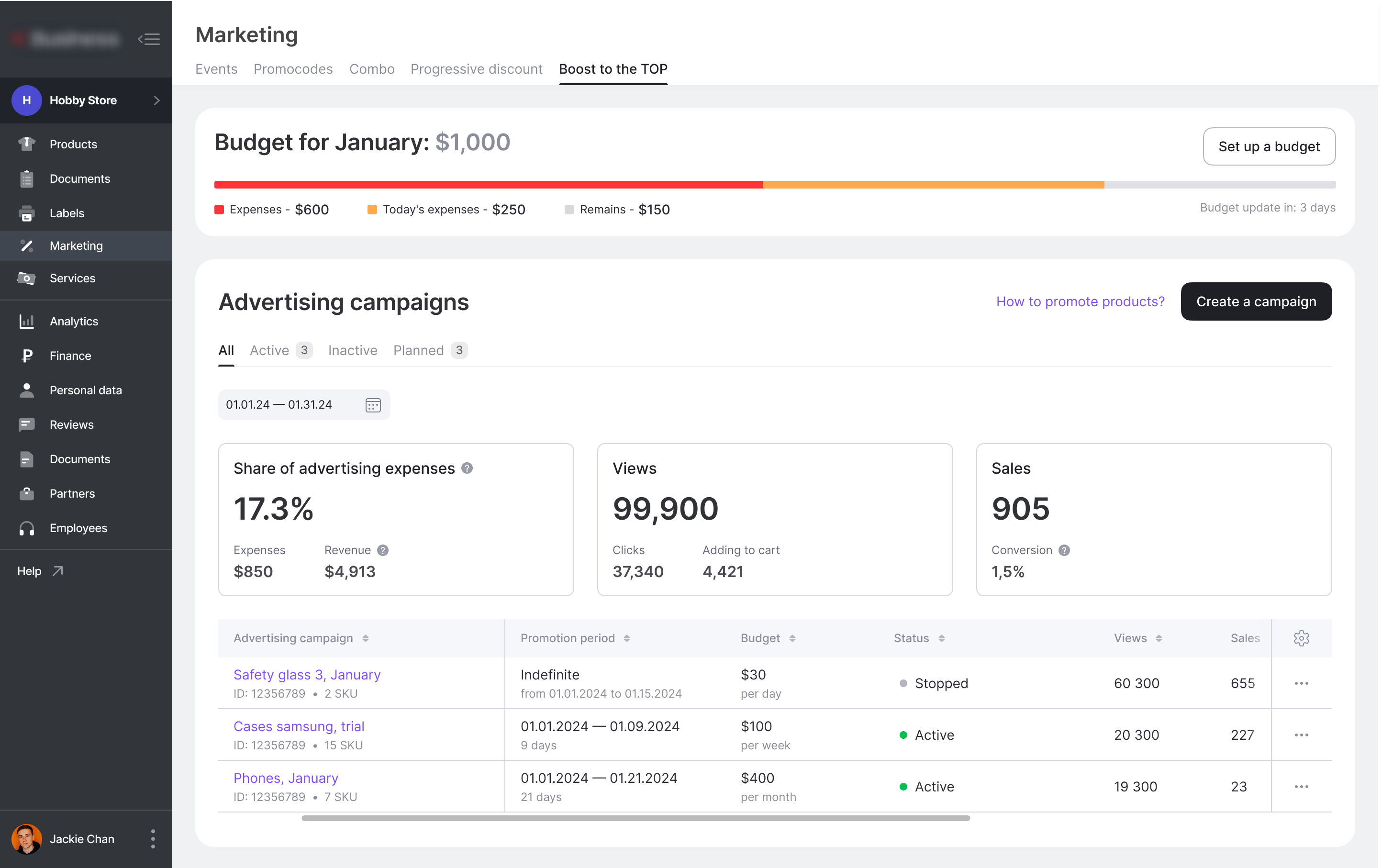
Main page
Problem: It is important for the seller to monitor advertising in their personal account and compare the effectiveness of different ads
Challenge: Create a dashboard that immediately shows the seller how the advertising is performing overall and for each campaign separately
Solution: The main comparison tool is a table. Users can compare advertising campaigns with each other and customize the column order — everyone sees only what they need. We added visualization of key metrics. Widgets with key indicators (CTR, impressions, orders, spend, etc) allow sellers to quickly understand how effective the ads are without diving into the tables
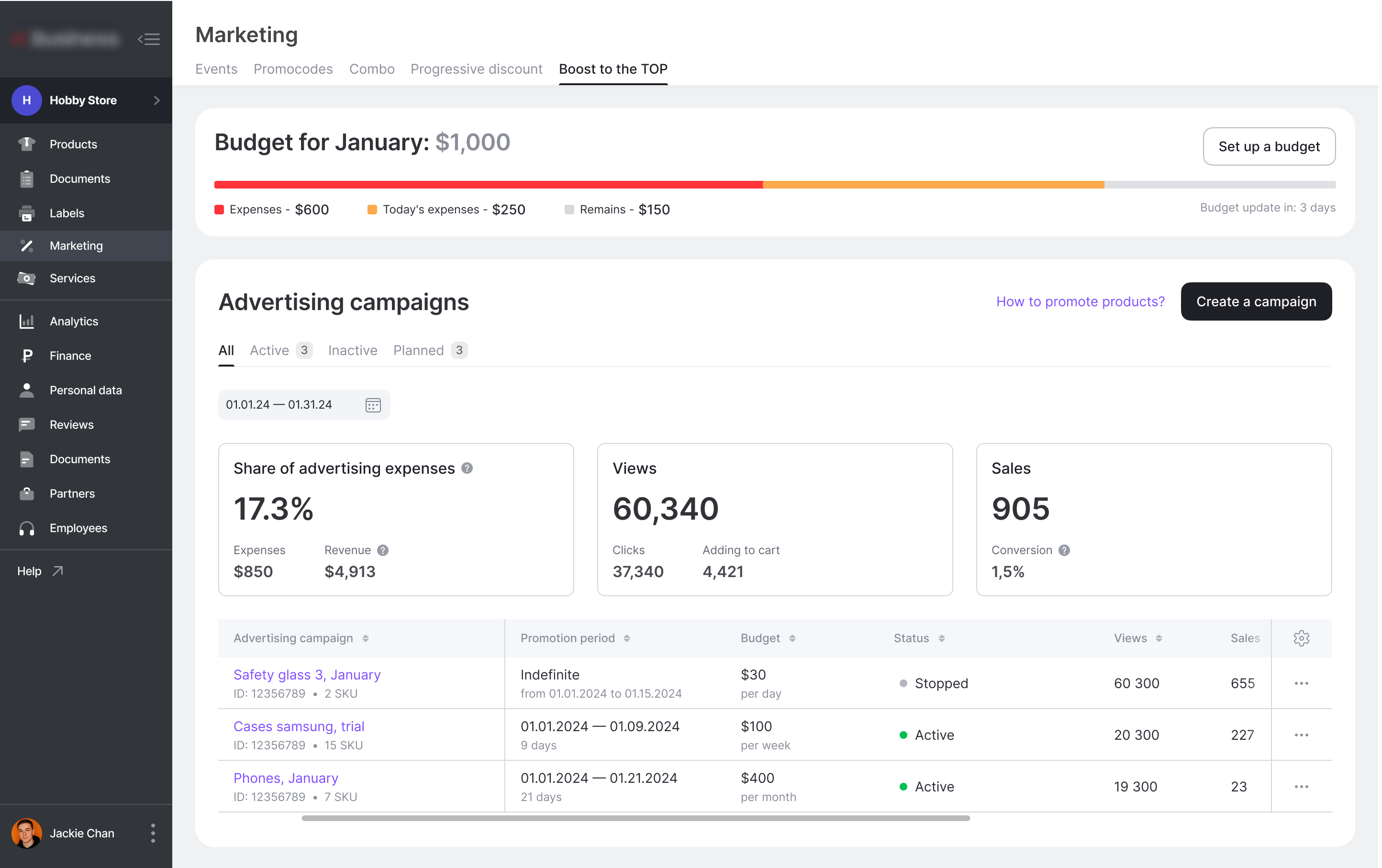
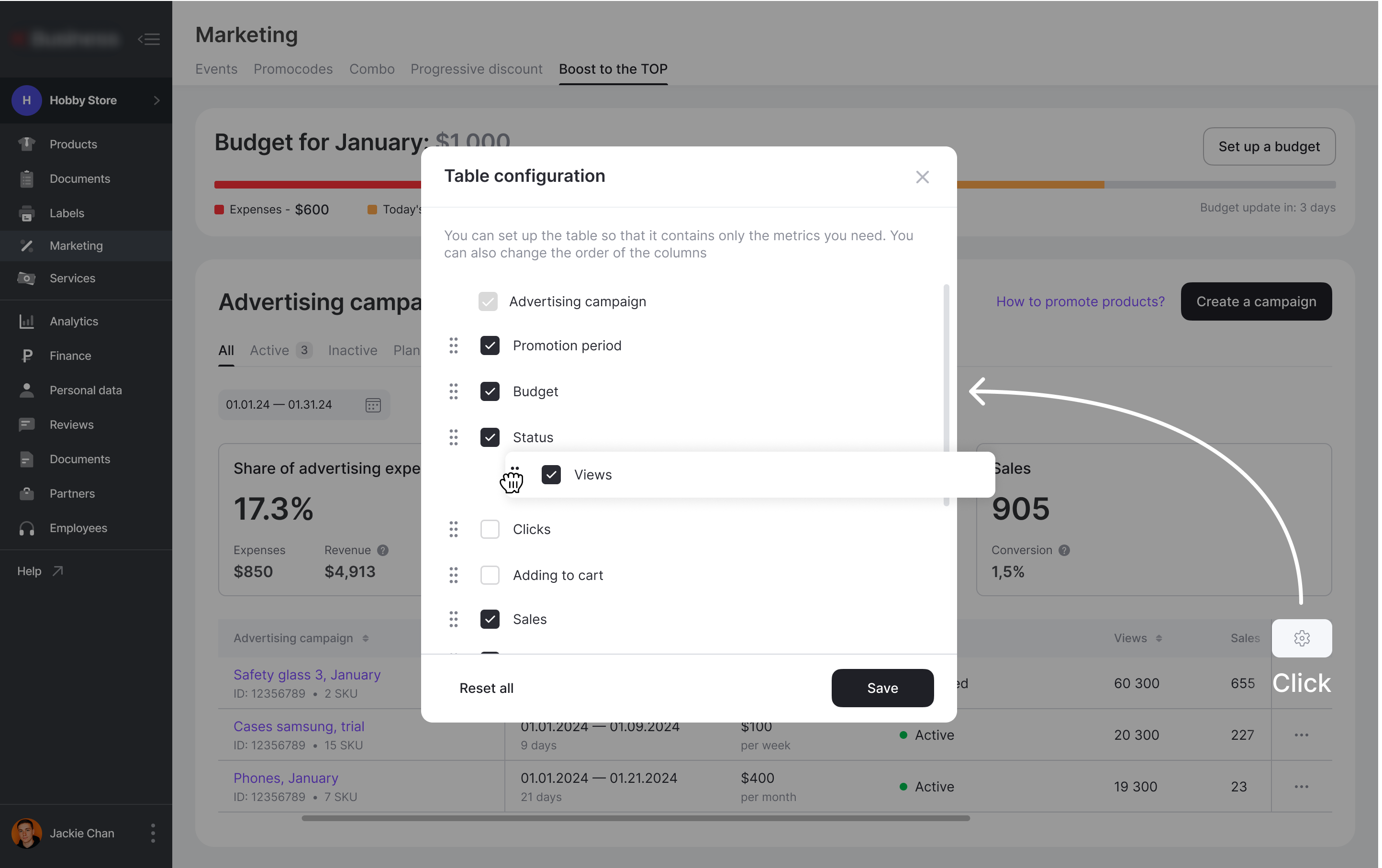
Table configuration
Problem: Different sellers prioritize different metrics
Challenge: Add customization options without overloading the page
Solution: Flexible table customization. Sellers can keep only the metrics they need and rearrange their order

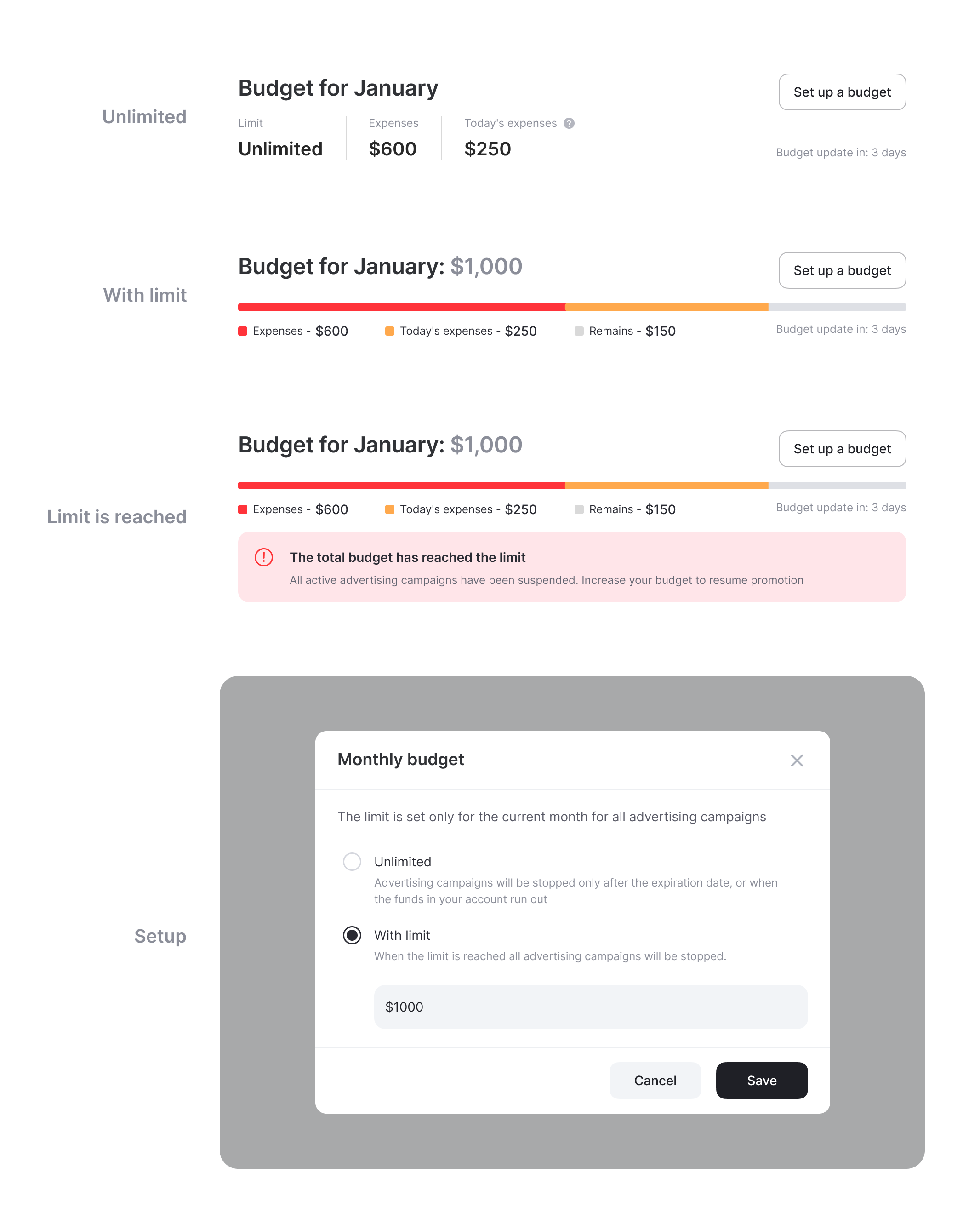
Budget control
Problem: There is no control over total spending when running multiple campaigns
Challenge: The widget should be simple, informative, and easy to understand
Solution: Added a separate widget displaying the total budget on the main page
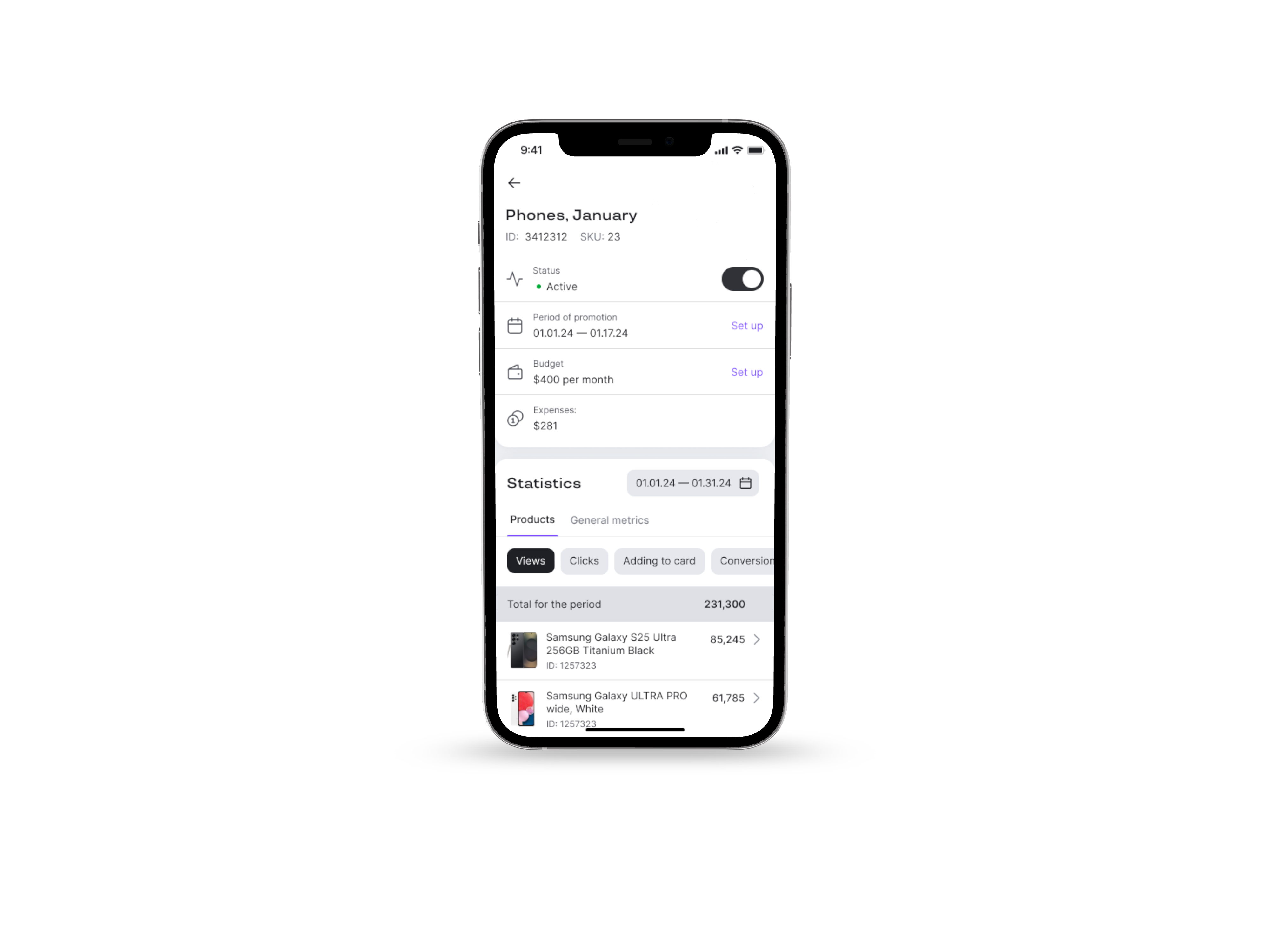
Campaign detail page
Problem: It’s important for the seller to be able to compare the performance of different products within a campaign — both in static reports and over time.
Challenge: Combine two different analysis methods in a single interface with easy switching between formats.
Solution: For each advertising campaign, we added a detailed statistics page. It includes two analysis methods:
- Table — for comparing metrics of each product in a static view.
- Chart — for comparing metrics dynamically over time.

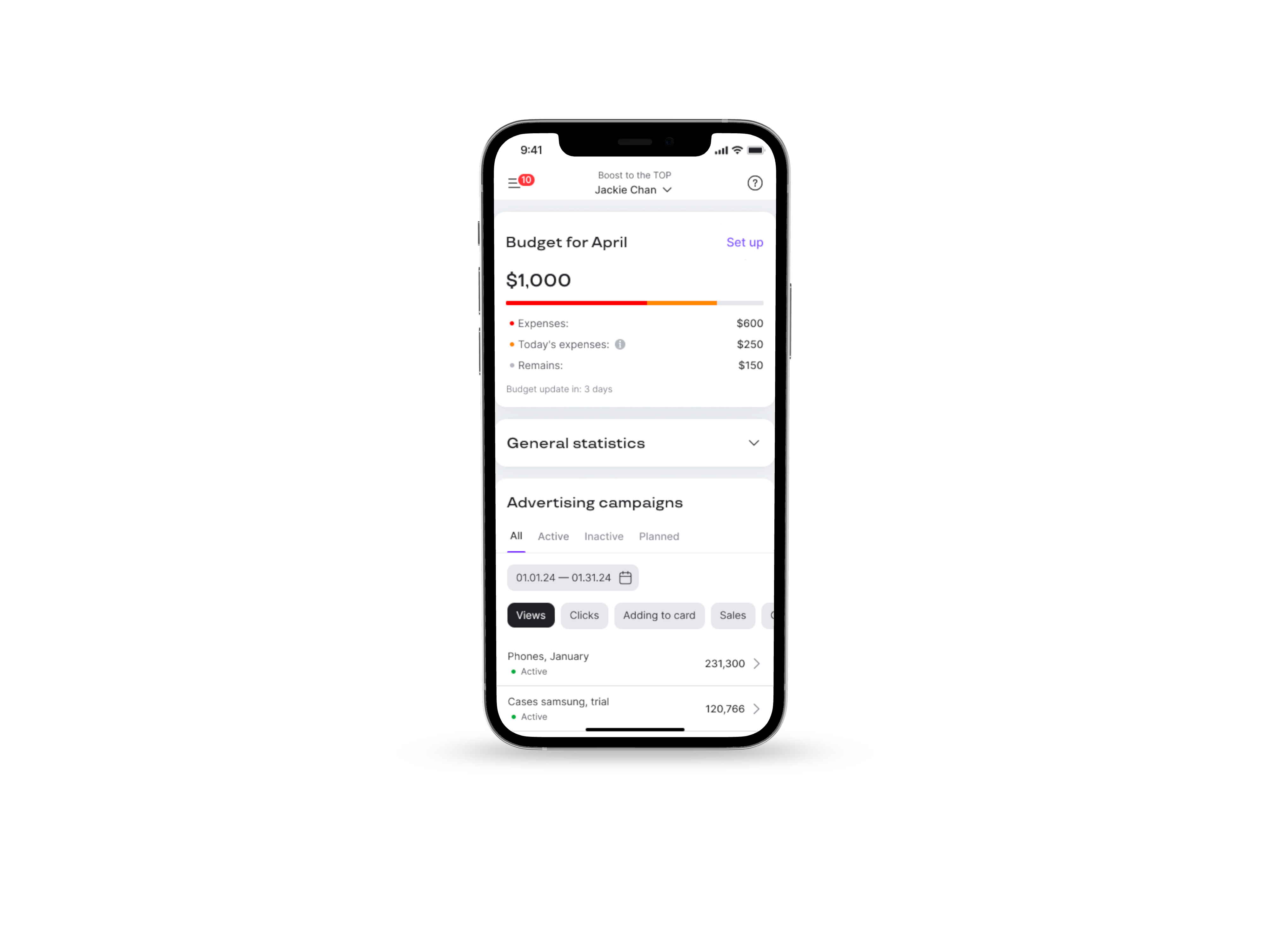
Mobile app version
Problem: In Uzbekistan, smartphones are the primary work tool. Sellers need quick access to their campaigns directly from their phones
Challenge:
- There are too many functions, settings, and data to monitor simultaneously.
- It is necessary to maintain the same logic as on the web version
Solution:
- Implemented statistics viewing only; campaign creation is available exclusively on the web version.
- Removed charts to simplify the interface.
- Added navigation by levels: campaign > product > keyword/phrase.
- Introduced widgets, customizable tables, and filters.
- Retained only key actions: change duration, adjust budget, pause campaign


Final
Pilot launch
Problem: If the tool were simply made available to everyone, users might not understand how to use it.
Bugs or incorrect usage could lead to financial losses and low adoption
Solution:
- Provided training sessions for sellers
- Created detailed step-by-step guides
- Launched a 3-month pilot program with 50 sellers
- Set up a Telegram chat for seller feedback
Result:
- Identified dozens of critical bugs
- Improved and refined the tool based on real user input


Seller feedback
recieved in the first weeks after launch

Ilshat Barrista
Got the first sale 😂Definitely thanks to the ad campaign — the product used to rank really low before

Ildar Airatovich
I was able to set a daily budget of $10 without any issues. I was also really pleased to see that there will be statistics on impressions, clicks, and add-to-cart events — plus the advertising cost share 👍 I've been waiting for this kind of data for a long time

Khab777
We launched ads for a store that hadn’t had a single sale in six months. I set up the campaign on the 20th, and we've been getting sales every day since. It really works — thank you


Boost to the TOP
Promotional tool for sellers on the marketplace Uzum Market
Context
Uzum is the largest marketplace in Uzbekistan and part of the Uzum ecosystem. Sellers lacked a convenient and transparent way to promote their products. Existing advertising tools were inconvenient and ineffective. We decided to launch a new advertising tool based on the CPM model.
Business goals
- Create a new, user-friendly promotion tool based on the CPM model
- Increase advertising revenue (AdRev)
- Boost GMV through advertising and sellers’ sales
- Build greater trust in advertising tools
- Grow the share of active advertisers
Results
15x
AdRev increased 15x compared to the previous model
+31%
The number of sellers actively using advertising grew by 31%
+35%
Average sales of sellers increased by 35%
3x
The number of promoted products tripled
New division
The project’s success led to creation of a dedicated “AdRev” team.
5%
“Boost to TOP” holds about 5% of Uzbekistan’s digital advertising market
My role
The sole designer on the team. I designed the product from scratch: conducted research, built the UX logic, created interfaces, and tested them with users.After launch, handled seller training, wrote instructions, and collected feedback and bug reports.The project involved 7 cross-functional teams and over 30 people.
Challenges
- High tool complexity. The tool was built from scratch and was comparable in complexity to Google Ads and Yandex.Direct.
- Dozens of new mechanics: CPM model, targeting, moderation, reporting, finance.
- First CPM advertising experience in the Uzbekistan market. Sellers had neither experience nor trust in the new format.
- Local specifics. Seller behavior and digital literacy levels differed significantly from other markets.
- Scalability. The tool needed to become the foundation for all future advertising on the platform.
- Cross-team development. Seven teams and over 30 people were involved in the development.
- Frequent requirement changes. The project went through a pivot: the business model changed, but deadlines remained the same.
- Lack of design system. Everything was designed from scratch, including scalable design patterns.
- Unstable processes. The company was growing, organizational structure was changing, there was team turnover — so autonomous work was necessary.
Discovery
To gain a deeper understanding of the task and constraints, a full discovery cycle was conducted:
- Briefings with stakeholders to clarify goals, risks, and limitations
- Competitor analysis
- Six interviews with sellers to identify pain points and expectations
- Problem analysis and creation of a pain points map
- Formulation of key scenarios and MVP requirements
All these steps helped lay a solid foundation for the product decisions.
Concepts and prototypes
Problem: Quickly determine which solution suits us best
Challenge: The tool is too large-scale and technically complex for traditional A/B testing
Solution: We used usability testing of different concepts during the design phase:
- Created 5+ different interface concepts.
- Developed clickable interactive prototypes for each.
- Conducted 20+ usability tests with sellers
Result:
- Identified misunderstandings of mechanics and blockers early on.
- Found an excellent working solution.
- Saved development time
Design
Creating an advertising campaign
Problem: Creating an advertising campaign requires filling in a large number of parameters
Challenge: The tool is complex and it’s easy to get confused with the settings
Solution: Broke down the campaign creation process into 3 consecutive steps:
- Setting general parameters: campaign name, budget, duration.
- Selecting products — a convenient list with filters, search, and SKU display.
- Configuring promotion placements — separately for each product
Result:
- Simplified the initial user experience with the tool.
- Made navigation clear even for beginners.
- Reduced the number of errors and incomplete settings.
Promotion settings
Problem: The seller needs flexible settings for each product in every promotion placement
Challenge: Transition to a CPM model requires very precise configuration for each promotion placement
Solution:
- Separated keywords and catalog categories, assigning them to each product.
- Display all catalog categories at once.
- Added negative keywords to exclude irrelevant queries.
- Added advertising cost settings for each promotion placement separately
Recommended keywords
Problem: Sellers don’t know which keywords to use for promoting their products
Challenge: Recommendations vary for each product
Solution: Added a list of popular search queries from the past 7 days. Sellers can select the needed keywords directly from the suggestions
Result: 70% of all keywords are added from this section
Bulk editing
Problem: Setting up ads takes too long when there are many similar products
Challenge: Not all products can be grouped together — it was important to exclude incompatible items.
Solution: Added bulk editing. Sellers select a group of similar products (e.g., within the same category) and apply unified promotion settings.
Result: According to analytics, 50% of sellers use this feature regularly.
Analytics
Main page
Problem: It is important for the seller to monitor advertising in their personal account and compare the effectiveness of different ads
Challenge: Create a dashboard that immediately shows the seller how the advertising is performing overall and for each campaign separately
Solution: The main comparison tool is a table. Users can compare advertising campaigns with each other and customize the column order — everyone sees only what they need. We added visualization of key metrics. Widgets with key indicators (CTR, impressions, orders, spend, etc) allow sellers to quickly understand how effective the ads are without diving into the tables
Table configuration
Problem: Different sellers prioritize different metrics
Challenge: Add customization options without overloading the page
Solution: Flexible table customization. Sellers can keep only the metrics they need and rearrange their order
Budget control
Problem: There is no control over total spending when running multiple campaigns
Challenge: The widget should be simple, informative, and easy to understand
Solution: Added a separate widget displaying the total budget on the main page
Campaign detail page
Problem: It’s important for the seller to be able to compare the performance of different products within a campaign — both in static reports and over time.
Challenge: Combine two different analysis methods in a single interface with easy switching between formats.
Solution: For each advertising campaign, we added a detailed statistics page. It includes two analysis methods:
- Table — for comparing metrics of each product in a static view.
- Chart — for comparing metrics dynamically over time.
Mobile app version
Problem: In Uzbekistan, smartphones are the primary work tool. Sellers need quick access to their campaigns directly from their phones
Challenge:
- There are too many functions, settings, and data to monitor simultaneously.
- It is necessary to maintain the same logic as on the web version
Solution:
- Implemented statistics viewing only; campaign creation is available exclusively on the web version.
- Removed charts to simplify the interface.
- Added navigation by levels: campaign > product > keyword/phrase.
- Introduced widgets, customizable tables, and filters.
- Retained only key actions: change duration, adjust budget, pause campaign
Final
Pilot launch
Problem: If the tool were simply made available to everyone, users might not understand how to use it.
Bugs or incorrect usage could lead to financial losses and low adoption
Solution:
- Provided training sessions for sellers
- Created detailed step-by-step guides
- Launched a 3-month pilot program with 50 sellers
- Set up a Telegram chat for seller feedback
Result:
- Identified dozens of critical bugs
- Improved and refined the tool based on real user input
Seller feedback
recieved in the first weeks after launch
Ilshat Barrista
Got the first sale 😂Definitely thanks to the ad campaign — the product used to rank really low before
Ildar Airatovich
I was able to set a daily budget of $10 without any issues. I was also really pleased to see that there will be statistics on impressions, clicks, and add-to-cart events — plus the advertising cost share 👍 I've been waiting for this kind of data for a long time
Khab777
We launched ads for a store that hadn’t had a single sale in six months. I set up the campaign on the 20th, and we've been getting sales every day since. It really works — thank you
Boost to the TOP
Promotional tool for sellers on the marketplace Uzum Market
Context
Uzum is the largest marketplace in Uzbekistan and part of the Uzum ecosystem. Sellers lacked a convenient and transparent way to promote their products. Existing advertising tools were inconvenient and ineffective. We decided to launch a new advertising tool based on the CPM model.
Business goals
- Create a new, user-friendly promotion tool based on the CPM model
- Increase advertising revenue (AdRev)
- Boost GMV through advertising and sellers’ sales
- Build greater trust in advertising tools
- Grow the share of active advertisers
Results
15x
AdRev increased 15x compared to the previous model
+31%
The number of sellers actively using advertising grew by 31%
+35%
Average sales of sellers increased by 35%
3x
The number of promoted products tripled
New division
The project’s success led to creation of a dedicated “AdRev” team.
5%
“Boost to TOP” holds about 5% of Uzbekistan’s digital advertising market
My role
The sole designer on the team. I designed the product from scratch: conducted research, built the UX logic, created interfaces, and tested them with users.After launch, handled seller training, wrote instructions, and collected feedback and bug reports.The project involved 7 cross-functional teams and over 30 people.
Challenges
- High tool complexity. The tool was built from scratch and was comparable in complexity to Google Ads and Yandex.Direct.
- Dozens of new mechanics: CPM model, targeting, moderation, reporting, finance.
- First CPM advertising experience in the Uzbekistan market. Sellers had neither experience nor trust in the new format.
- Local specifics. Seller behavior and digital literacy levels differed significantly from other markets.
- Scalability. The tool needed to become the foundation for all future advertising on the platform.
- Cross-team development. Seven teams and over 30 people were involved in the development.
- Frequent requirement changes. The project went through a pivot: the business model changed, but deadlines remained the same.
- Lack of design system. Everything was designed from scratch, including scalable design patterns.
- Unstable processes. The company was growing, organizational structure was changing, there was team turnover — so autonomous work was necessary.
Discovery
To gain a deeper understanding of the task and constraints, a full discovery cycle was conducted:
- Briefings with stakeholders to clarify goals, risks, and limitations
- Competitor analysis
- Six interviews with sellers to identify pain points and expectations
- Problem analysis and creation of a pain points map
- Formulation of key scenarios and MVP requirements
All these steps helped lay a solid foundation for the product decisions.
Concepts and prototypes
Problem: Quickly determine which solution suits us best
Challenge: The tool is too large-scale and technically complex for traditional A/B testing
Solution: We used usability testing of different concepts during the design phase:
- Created 5+ different interface concepts.
- Developed clickable interactive prototypes for each.
- Conducted 20+ usability tests with sellers
Result:
- Identified misunderstandings of mechanics and blockers early on.
- Found an excellent working solution.
- Saved development time
Design
Creating an advertising campaign
Problem: Creating an advertising campaign requires filling in a large number of parameters
Challenge: The tool is complex and it’s easy to get confused with the settings
Solution: Broke down the campaign creation process into 3 consecutive steps:
- Setting general parameters: campaign name, budget, duration.
- Selecting products — a convenient list with filters, search, and SKU display.
- Configuring promotion placements — separately for each product
Result:
- Simplified the initial user experience with the tool.
- Made navigation clear even for beginners.
- Reduced the number of errors and incomplete settings.
Promotion settings
Problem: The seller needs flexible settings for each product in every promotion placement
Challenge: Transition to a CPM model requires very precise configuration for each promotion placement
Solution:
- Separated keywords and catalog categories, assigning them to each product.
- Display all catalog categories at once.
- Added negative keywords to exclude irrelevant queries.
- Added advertising cost settings for each promotion placement separately
Recommended keywords
Problem: Sellers don’t know which keywords to use for promoting their products
Challenge: Recommendations vary for each product
Solution: Added a list of popular search queries from the past 7 days. Sellers can select the needed keywords directly from the suggestions
Result: 70% of all keywords are added from this section
Bulk editing
Problem: Setting up ads takes too long when there are many similar products
Challenge: Not all products can be grouped together — it was important to exclude incompatible items.
Solution: Added bulk editing. Sellers select a group of similar products (e.g., within the same category) and apply unified promotion settings.
Result: According to analytics, 50% of sellers use this feature regularly.
Analytics
Main page
Problem: It is important for the seller to monitor advertising in their personal account and compare the effectiveness of different ads
Challenge: Create a dashboard that immediately shows the seller how the advertising is performing overall and for each campaign separately
Solution: The main comparison tool is a table. Users can compare advertising campaigns with each other and customize the column order — everyone sees only what they need. We added visualization of key metrics. Widgets with key indicators (CTR, impressions, orders, spend, etc) allow sellers to quickly understand how effective the ads are without diving into the tables
Table configuration
Problem: Different sellers prioritize different metrics
Challenge: Add customization options without overloading the page
Solution: Flexible table customization. Sellers can keep only the metrics they need and rearrange their order
Budget control
Problem: There is no control over total spending when running multiple campaigns
Challenge: The widget should be simple, informative, and easy to understand
Solution: Added a separate widget displaying the total budget on the main page
Campaign detail page
Problem: It’s important for the seller to be able to compare the performance of different products within a campaign — both in static reports and over time.
Challenge: Combine two different analysis methods in a single interface with easy switching between formats.
Solution: For each advertising campaign, we added a detailed statistics page. It includes two analysis methods:
- Table — for comparing metrics of each product in a static view.
- Chart — for comparing metrics dynamically over time.
Mobile app version
Problem: In Uzbekistan, smartphones are the primary work tool. Sellers need quick access to their campaigns directly from their phones
Challenge:
- There are too many functions, settings, and data to monitor simultaneously.
- It is necessary to maintain the same logic as on the web version
Solution:
- Implemented statistics viewing only; campaign creation is available exclusively on the web version.
- Removed charts to simplify the interface.
- Added navigation by levels: campaign > product > keyword/phrase.
- Introduced widgets, customizable tables, and filters.
- Retained only key actions: change duration, adjust budget, pause campaign
Final
Pilot launch
Problem: If the tool were simply made available to everyone, users might not understand how to use it.
Bugs or incorrect usage could lead to financial losses and low adoption
Solution:
- Provided training sessions for sellers
- Created detailed step-by-step guides
- Launched a 3-month pilot program with 50 sellers
- Set up a Telegram chat for seller feedback
Result:
- Identified dozens of critical bugs
- Improved and refined the tool based on real user input
Seller feedback
recieved in the first weeks after launch
Ilshat Barrista
Got the first sale 😂Definitely thanks to the ad campaign — the product used to rank really low before
Ildar Airatovich
I was able to set a daily budget of $10 without any issues. I was also really pleased to see that there will be statistics on impressions, clicks, and add-to-cart events — plus the advertising cost share 👍 I've been waiting for this kind of data for a long time
Khab777
We launched ads for a store that hadn’t had a single sale in six months. I set up the campaign on the 20th, and we've been getting sales every day since. It really works — thank you